Search

Google

Monday, August 18, 2008

New Video PCs from iBUYPOWER Launch

If you’re an amateur videographer who loves to post their videos online, then the new Video PC line by iBUYPOWER is right up your alley. With three new PC options, you will be more than ready to shoot some video and upload it to your favorite site with ease.


First up, there is the Video Bot, which is contained in a NZXT Apollo case and has an Intel Core 2 Quad Q9300 processor and 4GB DDR2-800 memory. And you can’t forget the NVIDIA 9800GT 512MB Video card, Built-in 8 channel surround sound and Logitech keyboard and optical mouse, all for $1,299.

The second model in the series is the Video Pro, which sports a Gigabyte Poseidon case, an Intel Core 2 Duo Q9550 processor, 8GB DDR2-880 memory, an ATI Radeon HD 4850 512MB video card and a Blu-ray re-writer and DVD+R/RW Burner combo drive. This thing is packed and it’ll cost you $1,799.

But if you really want to go all out, there’s the Video Extreme. This this is chock full of goodies. It has an Intel Core 2 Extreme Processor QX9770, 8GB DDR3-1333 memory, 64 GB solid state disk, an ATI Radeon HD 4870 512 MB video card and Blu-ray re-writer/burner all encased in the Thermaltake Armor+ Gaming tower case. This last one is for the truly devoted and will cost you $4,299.

As a part of a special promotion, iBUYPOWER is giving away a Video Pro to whoever wins their Favorite Gaming Moments YouTube Contest.

All models come with Adobe Premier Elements 4.0 and the Pinnacle Dazzle DVD Recorder. These new systems will begin shipping August 15.

Thursday, August 14, 2008

APPEARANCE TWEAKS

Remove More Themes Online... from Themes Dropdown Box
[-HKEY_LOCAL_MACHINE\SOFTWARE\Microsoft\Windows\CurrentVersion\Themes\DownloadSites]

Change Default Desktop Wallpaper
[HKEY_LOCAL_MACHINE\Software\Microsoft\Internet Explorer\Desktop\General]
"BackupWallpaper"="%Windir%\\Web\\Wallpaper\\lh_bliss.bmp"
"Wallpaper"="%Windir%\\Web\\Wallpaper\\lh_bliss.bmp"

COMMANDS III (DESKTOP TWEAKS)

Disable Desktop Cleanup Wizard
[HKEY_LOCAL_MACHINE\Software\Microsoft\Windows\CurrentVersion\Explorer\Desktop\CleanupWiz]
"NoRun"=dword:00000001

Remove Shotcut To.. Prefix on Desktop Shorcut Names
[HKEY_CURRENT_USER\Software\Microsoft\Windows\CurrentVersion\Explorer]
"Link"=hex:00,00,00,00

Remove Arrow Overlay from Desktop Shortcuts
[HKEY_CLASSES_ROOT\lnkfile]
"IsShortcut"=-

Put My Computer Shortcut on Desktop
[HKEY_LOCAL_MACHINE\SOFTWARE\Microsoft\Windows\CurrentVersion\Explorer\HideDesktopIcons\NewStartPanel]
"{20D04FE0-3AEA-1069-A2D8-08002B30309D}"=dword:00000000

Put My Network Places Shortcut on Desktop
[HKEY_LOCAL_MACHINE\SOFTWARE\Microsoft\Windows\CurrentVersion\Explorer\HideDesktopIcons\NewStartPanel]
"{208D2C60-3AEA-1069-A2D7-08002B30309D}"=dword:00000000

Put My Documents Shortcut on Desktop
[HKEY_LOCAL_MACHINE\SOFTWARE\Microsoft\Windows\CurrentVersion\Explorer\HideDesktopIcons\NewStartPanel]
"{450D8FBA-AD25-11D0-98A8-0800361B1103}"=dword:00000000

COMMANDS II (SYSTEM PERFORMANCE TWEAKS)

Speed up Opening of My Computer and Windows Explorer
[HKEY_LOCAL_MACHINE\SYSTEM\CurrentControlSet\Services\stisvc]
"Start"=dword:00000004
[HKEY_CURRENT_USER\Software\Microsoft\Windows\CurrentVersion\Policies\Explorer]
"NoSaveSettings"=dword:00000000
[HKEY_CURRENT_USER\Software\Microsoft\Windows\CurrentVersion\Explorer\Advanced]
"NoNetCrawling"=dword:00000001
[HKEY_LOCAL_MACHINE\SOFTWARE\Microsoft\Windows\CurrentVersion\Policies\Explorer]
"NoRemoteRecursiveEvents"=dword:00000001

Speed up Copying/Moving of .ZIP Files
[-HKEY_CLASSES_ROOT\.zip\CompressedFolder]
[-HKEY_CLASSES_ROOT\CLSID\{E88DCCE0-B7B3-11d1-A9F0-00AA0060FA31}]
[-HKEY_LOCAL_MACHINE\SOFTWARE\Classes\CompressedFolder]

Speed up Shutdown
[HKEY_CURRENT_USER\Control Panel\Desktop]
"AutoEndTasks"="1"
"HungAppTimeout"="100"
"WaitToKillAppTimeout"="1000"
[HKEY_LOCAL_MACHINE\SYSTEM\CurrentControlSet\Control]
"WaitToKillServiceTimeout"="1000"

Speed up Access to .AVI Media Files
[-HKEY_CLASSES_ROOT\CLSID\{87D62D94-71B3-4b9a-9489-5FE6850DC73E}]]
[-HKEY_CLASSES_ROOT\SystemFileAssociations\.avi\shellex\PropertyHandler]
[-HKEY_LOCAL_MACHINE\SOFTWARE\Classes\CLSID\{87D62D94-71B3-4b9a-9489-5FE6850DC73E}\InProcServer32]

Speed Up Browsing Remote Computers
[-HKEY_LOCAL_MACHINE\SOFTWARE\Microsoft\Windows\CurrentVersion\Explorer\RemoteComputer\NameSpace\{D6277990-4C6A-11CF-8D87-00AA0060F5BF}]
[-HKEY_LOCAL_MACHINE\SOFTWARE\Microsoft\Windows\CurrentVersion\Explorer\RemoteComputer\NameSpace\{2227A280-3AEA-1069-A2DE-08002B30309D}]

Optimize Core System Performance
[HKEY_LOCAL_MACHINE\SYSTEM\CurrentControlSet\Control\Session Manager\Memory Management]
"DisablePagingExecutive"=dword:00000001

USEFUL COMMANDS I (Startup / Shutdown)

Allows boot files to be placed optimally on the hard-drive for faster boots.
[HKEY_LOCAL_MACHINE\SOFTWARE\Microsoft\Dfrg\BootOptimizeFunction]
"Enable"="Y"

Speed up shutdown
[HKEY_CURRENT_USER\Control Panel\Desktop]
"AutoEndTasks"="1"
"HungAppTimeout"="100"
"WaitToKillAppTimeout"="1000"
[HKEY_LOCAL_MACHINE\SYSTEM\CurrentControlSet\Control]
"WaitToKillServiceTimeout"="1000"

Disable Automatic Restart in the event of a BSOD
[HKEY_LOCAL_MACHINE\SYSTEM\CurrentControlSet\Control\CrashControl]
"AutoReboot"=dword:00000000


Prefetcher tweak (faster booting) boot and program prefetch use 00000003 or Boot only 00000002


[HKEY_LOCAL_MACHINE\SYSTEM\CurrentControlSet\Control\Session Manager\Memory Management\PrefetchParameters]
"EnablePrefetcher"=dword:00000002

Clear the Page File at System Shutdown for security (makes shutdown slower when activated)
[HKEY_LOCAL_MACHINE\SYSTEM\CurrentControlSet\Control\Session Manager\Memory Management]
"ClearPageFileAtShutdown"=dword:00000001

Disable Hibernate
[HKEY_LOCAL_MACHINE\SYSTEM\CurrentControlSet\Control\Session Manager\Power]
"Heuristics"=hex:05,00,00,00,00,01,00,00,00,00,00,00,00,00,00,00,3f,42,0f,00

Disable Shutdown Event Tracker
[HKEY_LOCAL_MACHINE\SOFTWARE\Policies\Microsoft\Windows NT\Reliability]
"ShutdownReasonOn"=dword:00000000
"ShutdownReasonUI"=dword:0000000

Monday, August 11, 2008

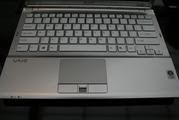
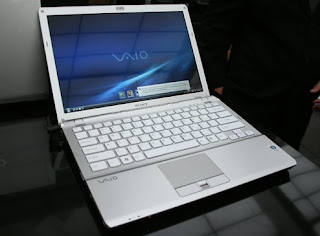
Sony Vaio FW and SR Series: First 16.4-Inch Notebook, MacBook Style Keyboards

Two series of Vaio Centrino 2 consumer notebooks: FW is the world's first 16.4-inch widescreen notebook, meant to deliver a 17-inch widescreen 16:9 experience in a 15-incher's footprint. (The math sort of works.) It's optimized for HD and Blu-ray playback (though optional) with built-in PS3 and Vaio Home Theater PC streaming. The
SR-series notebooks bring some higher-end features down to the consumer level at a decent, with an LED-backlit 13.3-inch widescreen and G-sensor HDD shock protection. Every Vaio notebook (except the BZ biz class laptops) has the new MacBook style-keyboard—though Sony says they did it first, 2003—as well as a crapware manager


SAN DIEGO, July 15, 2008 Sony today unveiled the VAIO® FW notebook—a multimedia PC that displays HD movies the way they were meant to be seen.

Part of a series, the VAIO FW notebook comes in multiple configurations, including a premium and a standard model. The premium model plays Blu-ray Disc™ high-definition content like movies in full 1080 HD resolution when connected to a compatible HDTV. It can also record, store and play back personal content on high-capacity BD media.
Weighing a little over six pounds, the FW notebook features the world’s first 16.4-inch display, which combines the benefits of a slightly larger17-inch widescreen with the smaller “footprint” of a 15.4-inch model.

Friday, August 8, 2008

AMD unleashes triple-core, 5 new quad-cores Processors

Everything hasn’t exactly been great for AMD lately, but the plucky chip maker has some news for us today. Despite the tough times, the company earned a number of positive reactions from the recent 780G announcement, and it is following that up with three announcement today.
First, triple-core is finally here. We have been hearing about this for months, and after all complaints about triple-core being nothing more than failed quad-core processors, consumers will be able to find out for themselves. The triple core Phenoms will launch as mainstream processors, aimed at users who are interested in additional performance relative to dual-core offerings, without having to substantially increase the amount they are spending. AMD says that triple-core Phenoms will be ideal for budget-minded users who have high-definition content in mind, and that the processor will be a great match for 780G.
So far, we know about the Phenom 8600 (2.3GHz) and 8400 (2.1GHz). They will have L1 cache sizes of 64K of instruction and 64K of data cache per core (512KB total L1) and L2 will hold 512KB of L2 data cache per core (2MB total L2 per processor). These are 65 nm processors that are backwards compatible with AM2 motherboards. The TDP for both models is 95W. We are still waiting on pricing information, but it looks like they will be a bit over US$150.The next piece of news dropped concerned new quad-core processors, including the Phenom X4 9850 Black Edition and Phenom X4 9750. These are additions to AMD’s quad-core lineup that will run at 2.5GHz and 2.4GHz, with TDP ratings of 125W. The new in the 95W TDP are the 9650 and the 9550, which will come in at 2.3GHz and 2.2GHz. So, nothing groundbreaking, but the larger point is that AMD is aiming to make quad-core accessible, while maintaining it as the company’s high-end offering. A quad-core Phemon matched with the 790 chipset is the companies top-shelf offering for gaming, supposing you also pony up the dough for a competitive video card. These are bug-free B3 revision processors.